
Job Description Generator: Build a Frontline Posting in Under a Minute
Pick a role, a shift and how you want to state pay, and the generator below writes a complete job description you can copy straight into your applicant tracking system. It is built for hourly and frontline work rather than for office roles, every bracketed field is yours to replace, and it flags the one requirement in each role that quietly costs employers applicants.
The generator
A note on who's writing this
Boostpoint sells recruitment advertising, and a free tool on a vendor's site is usually a form in disguise. This one is not: there is no email gate, no watermark, nothing is stored, and the page tells you plainly further down that a job description is a weak lever compared with what happens after somebody taps your ad. The structure and the role notes are our editorial judgment from writing these postings for frontline employers; where we cite figures about what advertising costs, they come from our published 2026 benchmark and are labeled as ours.
What this generator does differently
Most job description generators are built for office hiring and produce a paragraph of company culture followed by a bulleted list of soft skills. That output does very little for a warehouse, a kitchen or a service van, because the person reading it decides on four things — the money, the shift, the location and whether they are eligible — and a generic template buries all four.
So this one is scoped narrowly and opinionated on purpose:
- Twelve frontline roles, written specifically. A CNA's responsibilities are not a paraphrase of a warehouse associate's. Each role carries its own duties, its own real requirements and its own separation of required from preferred.
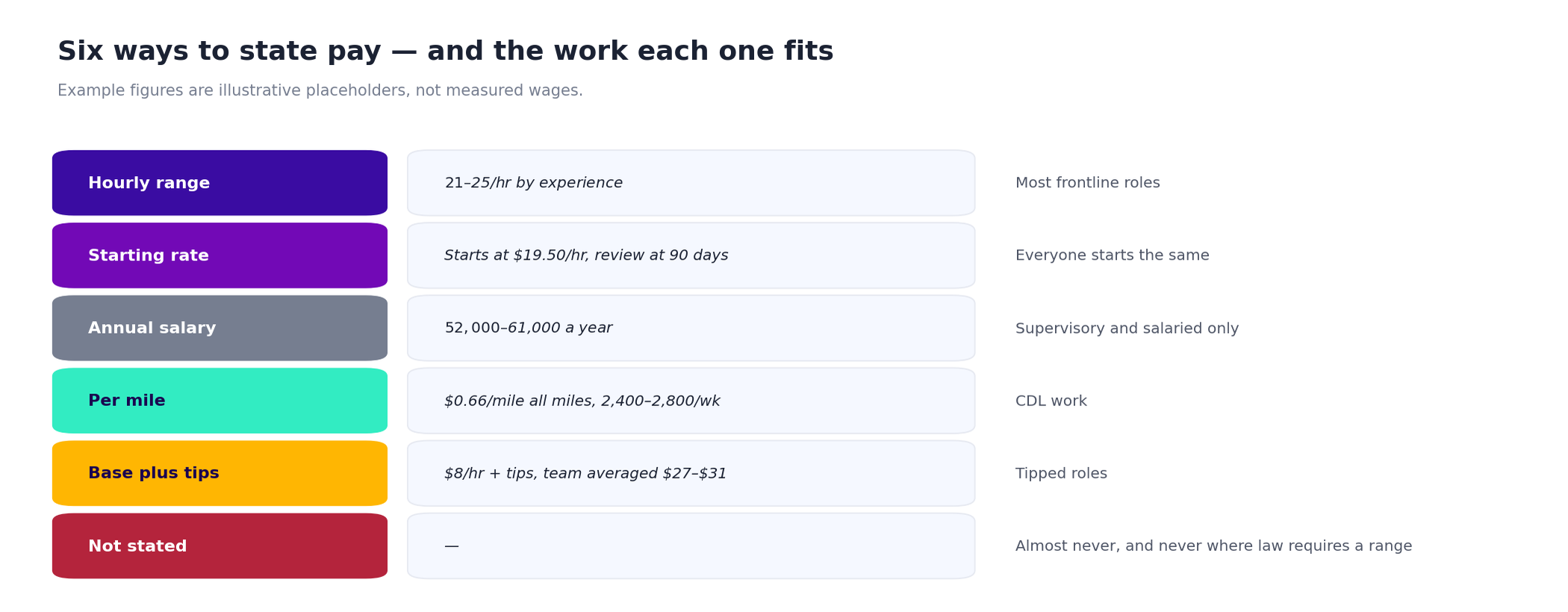
- Pay comes first and has six shapes. An hourly range, a starting rate, a salary, a per-mile rate, base plus tips, or — if you insist — not stated, which triggers a warning rather than silently producing a weaker posting.
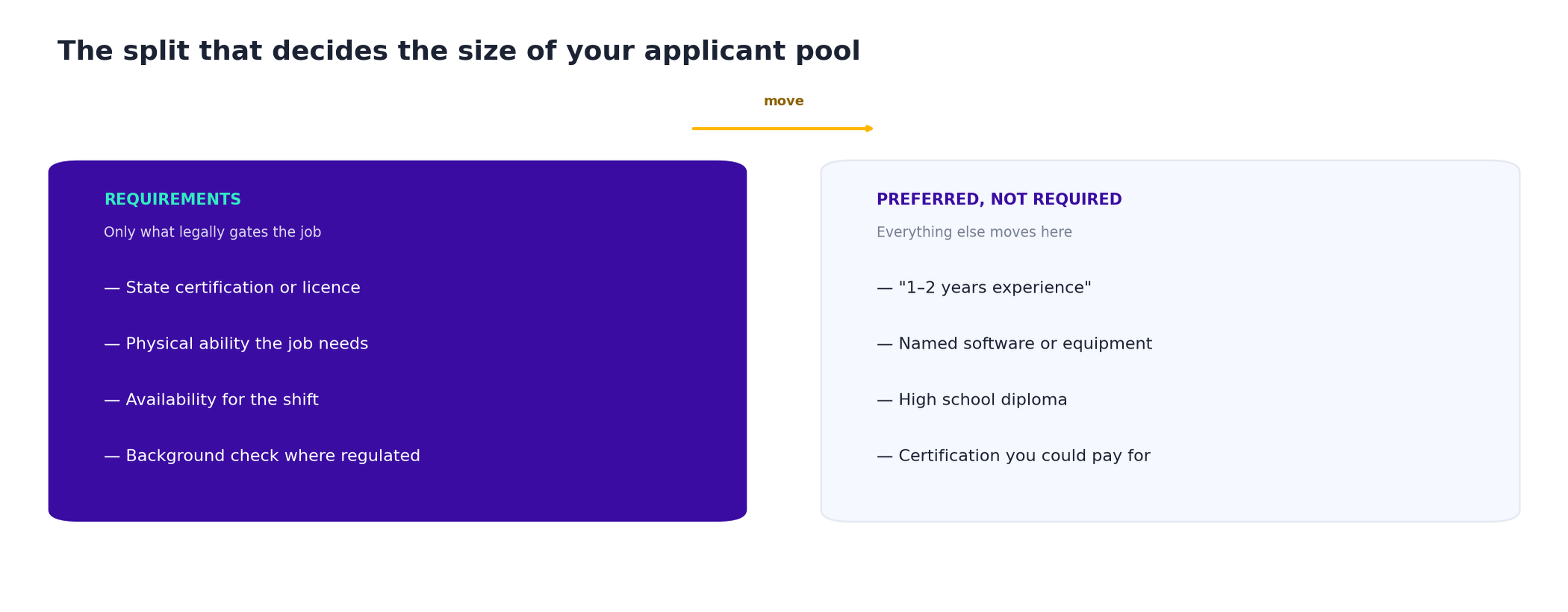
- Requirements are split honestly. Anything legally required stays in Requirements; everything else moves to "Preferred, not required", because that single split is the most common cause of a thin applicant pool.
- Each role gets one specific warning. The forklift note is about OSHA's employer-specific evaluation duty. The electrician note is about tying pay to the license tier. They are the things we see cost employers applicants, role by role.
- No signup, no watermark, nothing stored. The whole thing runs in your browser; close the tab and it is gone.
The six ways to state pay, and when each one is right
The pay selector is the most consequential control in the generator, because the shape of the number matters almost as much as the number. A driver comparing two carriers reads cents per mile against weekly miles; an hourly candidate reads a range against a shift; a server reads a combined figure with its basis. Give any of them the wrong shape and they cannot compare you with the employer next door, which usually means they do not try. The channel guide covers which of them you are likely to reach at all.
| Format | Use it when |
|---|---|
| Hourly range | Experience genuinely changes the rate, and you are willing to honor the top of the range. The default for most frontline roles. |
| Starting rate | Everyone starts at the same number. Pair it with when the first review happens, or the figure reads as a ceiling. |
| Annual salary | Supervisory and salaried roles only. Using it for hourly work signals a job that is not hourly and attracts the wrong applicants. |
| Per mile | CDL work. State it on all miles rather than loaded miles, and put weekly miles next to it — the rate alone is not a paycheck. |
| Base plus tips | Tipped roles. Give a realistic combined hourly with the period it came from, and say whether tips are pooled. |
| Not stated | Almost never — and where a state or city requires a range in the posting, not at all. The generator will warn you rather than produce it quietly. |
What a job description is for, and what it is not for
A job description is a complete document. It lives in your applicant tracking system and on your careers page, it runs to several hundred words, and its job is to be accurate — duties, requirements, physical demands, schedule, benefits. It is also a legal and operational artefact: it is what you point at in a dispute about the role, and what a manager uses to write a performance review.
It is not the advertisement. The ad that runs in a feed is four or five lines and has to interrupt somebody who was not job hunting. Generating a good job description and then posting it verbatim as an ad is the most common mistake in frontline hiring — our help wanted ad examples library shows what the short form looks like for fifteen roles, and job ad copywriting covers the method for turning one into the other.
If your role is one of the twenty-seven we have written out in full, the hand-written version will beat anything a generator produces: our job description templates carry BLS pay data, the requirements analysis and a copy-paste template per role.
The three fields that decide whether it works
| Field | Why it decides the outcome |
|---|---|
| The pay figure | It is the first thing read and the most common thing omitted. "Competitive pay" is interpreted by experienced hourly workers as a signal that it is not. A growing list of states and cities also requires a range in the posting itself — our job posting requirements page tracks which. |
| The shift, exactly | Days, start time, end time, and whether the days off are consecutive. In a category where most employers advertise a similar wage, the schedule is the differentiator you actually control — and "flexible availability required" is read as "we will change your life week to week". |
| The one real requirement | Whatever legally gates the job — the certification, the license, the endorsement — belongs in Requirements as a single line, phrased as the question your application form will ask. Everything else belongs under Preferred. |
One more habit worth borrowing from the roles we have written out in full: put the days off next to the shift. "Four 10s, Mon–Thu, off Friday through Sunday" is a stronger offer than fifty cents an hour in most warehouse markets, it costs nothing to state, and almost nobody states it.
After the description: what actually gets you applicants
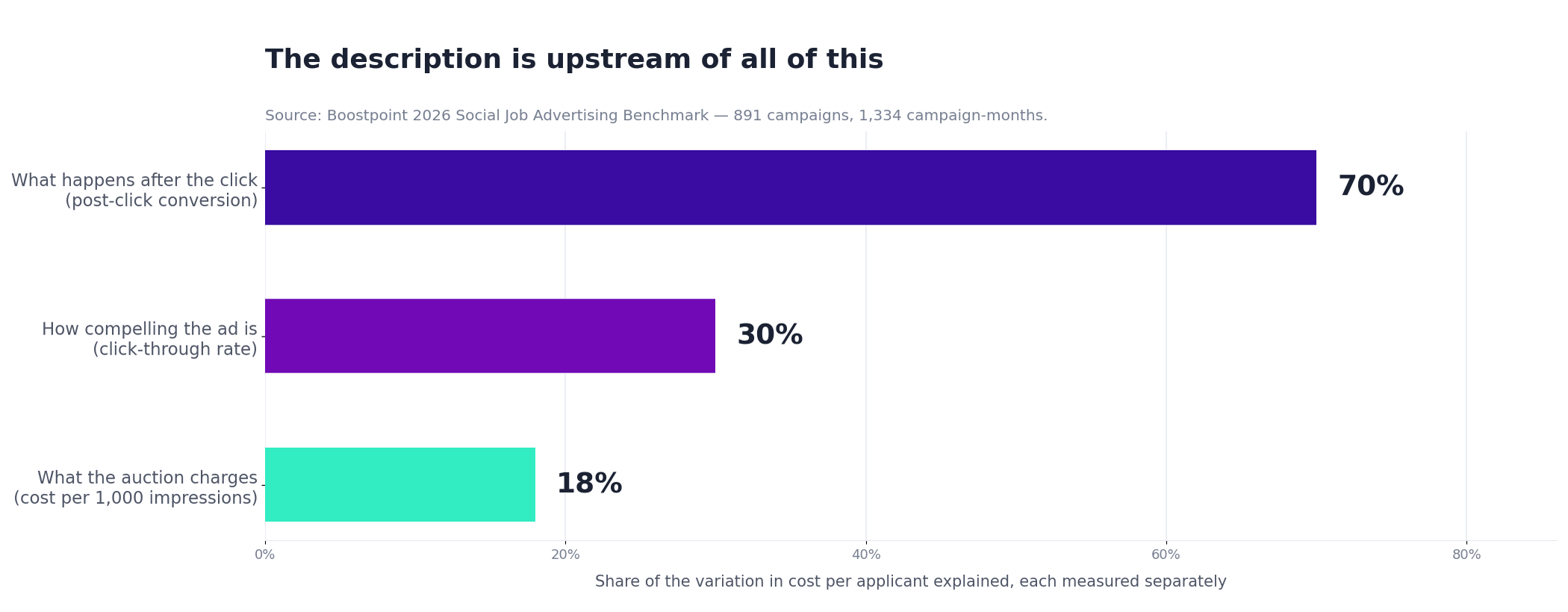
A job description is a necessary document and a weak lever. Across 891 campaigns and 1,334 campaign-months in our 2026 benchmark, what happens after somebody taps an advertisement explains about 70% of the variation in cost per applicant; click-through rate explains about 30%, and what the ad auction charges about 18%. Campaigns where more than 35% of clickers finished the application produced applicants at $1.61 each; campaigns under 5% produced them at $53.77.
That is a specific instruction about what to do once the description is written. Keep the application short, keep it on the platform the candidate was already using, and ask only what genuinely disqualifies somebody. The full arithmetic is on our candidate conversion rate page.
Should you use AI to write a job description?
For a first draft, yes — with two conditions. A general-purpose model does not know your state's scope-of-practice rules, your license tiers or your local wage market, and it will produce confident, plausible requirements that are wrong for your jurisdiction. It also tends toward the generic office register that this generator is built to avoid.
The reliable division of labor is to let a tool produce the structure and to supply the four facts yourself: the pay, the shift, the location, and the one requirement that legally gates the role. That is exactly what the generator above asks for, and it is why it uses brackets rather than inventing numbers.
If you'd rather use a general-purpose model, our guide to ChatGPT for recruiting has job description and job ad prompts built around the same rule: you supply the facts, the model supplies the structure.
A generator can give you the structure. Only you can supply the wage — and the wage is the part that decides whether anyone answers.
Frequently asked questions
AI job description generator, AI job posting generator, job ad generator: what the labels actually mean
Three phrases, three different outputs, and buyers get sent to the wrong tool constantly because the words are used loosely. The distinction is not about the technology. It is about which document you end up holding.
| What people search for | What they need | What it is for |
|---|---|---|
| AI job description generator | A structured internal document: duties, requirements, reporting line, physical demands, pay band | Hiring approval, onboarding, performance conversations, an ADA-defensible record of essential functions |
| AI job posting generator | The public version of that document, laid out for a job board or a careers page | Getting found by somebody searching for the title this week |
| Job ad generator | Three to five lines of persuasion for a social feed, where nobody is searching | Reaching employed people who were not looking, which is most of the frontline workforce |
The generator on this page produces the first two. It is deliberately not an ad writer, because an ad and a description fail for opposite reasons: a description that reads like an ad is useless in an approval or an accommodation conversation, and an ad that reads like a description is scrolled past. If what you need is the third row, the job ad copywriting page has the templates.
On the “AI” part, the honest position: a general-purpose model will write you a fluent job description in twenty seconds, and the fluency is the problem. It will invent a pay range, assert requirements you never set, list certifications the role does not need, and produce the same eight bullet points for a warehouse associate that it produces for a hotel housekeeper — because it is averaging every job description on the public internet, and most of those are also copies. Three specific failure modes are worth watching for whichever tool you use:
- Invented specifics. Pay ranges, years of experience and certification requirements that appear without you supplying them. Every one of those is a number somebody may later be held to.
- Requirement inflation. Models reproduce the internet's habit of listing preferences as requirements, which narrows your applicant pool before the posting has been seen by anybody.
- Averaged duties. The generic bullets are the ones a candidate has read on twenty other postings, so they do no selecting at all.
Which is why this generator uses square brackets instead of filling everything in. The bracketed fields are the parts only you know — your rate, your shift, your equipment, your certifying body — and they are also the only parts that make the posting work. A tool that fills them in for you has not saved you the work; it has hidden the work and attached a number to your name.
Is this job description generator free?
Yes, and there is nothing to sign up for. It runs entirely in your browser — no account, no email, no watermark, and nothing you type is stored or sent anywhere. Change a field, copy the result, close the tab. If you want the role written out in full with pay data and requirement analysis, our job description template library covers twenty-seven roles.
What roles does it cover?
Twelve frontline roles: CNA, caregiver, medical assistant, warehouse associate, forklift operator, CDL-A driver, non-CDL delivery driver, line cook, server, electrician, HVAC service technician and groundskeeper. They were chosen because they are the categories where a generic office-style template does the most damage, not because they are the only jobs worth advertising.
Why does it use square brackets instead of filling everything in?
Because the bracketed fields are the ones a generator cannot know and should not guess: your wage, your shift times, your state, your certification requirements. A tool that invents a plausible-looking salary range produces a posting that is wrong in the one place accuracy matters most. Brackets make the gaps visible so none of them ships by accident.
What should a job description include?
A title people actually search, a summary that states pay, shift and location in the first two sentences, the responsibilities as they occur on a shift, requirements limited to what genuinely gates the role, a separate preferred list, the schedule and pay, and benefits. Anything that is not one of those competes for attention with the parts that decide whether somebody applies.
How long should a job description be?
Long enough to be accurate and complete — typically 300 to 600 words for a frontline role. Length is not the problem people think it is, because the job description is read by somebody who has already decided to consider the job. The advertisement is what has to be short, and it is a different document.
Can I use AI to write a job description?
For structure and first drafts, yes. The failure mode is jurisdiction: a general model does not reliably know your state's scope-of-practice rules, license tiers or wage market, and it states wrong requirements as confidently as right ones. Supply the pay, the shift, the location and the legally required credential yourself, and let the tool handle the shape.
Do I have to put the salary in a job description?
In several states and cities, yes — a growing number require a pay range in the posting, and our job posting requirements page tracks which. Everywhere else it is optional and still the highest-value line you can write. If you select "not stated" in the generator, it will warn you rather than quietly producing a weaker posting.
Is a job description the same as a job ad?
No. The description is a complete internal document that lives in your applicant tracking system and serves operational and legal purposes. The advertisement is four or five lines written to interrupt somebody who was not job hunting. Posting the description verbatim as an ad is the most common mistake in frontline hiring — they are different documents doing different jobs.
What is the difference between an AI job description generator and a job ad generator?
A job description generator produces a structured internal document — duties, requirements, reporting line, physical demands, pay band — used for hiring approval, onboarding and as a record of essential functions. A job ad generator produces three to five lines of persuasion for a social feed, where the reader was not searching. They fail for opposite reasons, so one tool should not be asked to do both.
Is an AI job posting generator accurate?
It is fluent, which is not the same thing. General-purpose models reliably invent pay ranges, assert years of experience you never specified, add certifications the role does not need, and produce averaged duty bullets that a candidate has already read on twenty other postings. Treat any specific number a model produces as something you have to supply or verify, because it is a number you may later be held to.
Can I use a job ad generator instead of writing the posting myself?
For the structure, yes — that is what a generator is good for. For the specifics, no, and it is not a limitation worth engineering around: the rate, the shift, the equipment, the commute and the certifying body are the only parts of a posting that do any selecting, and they are exactly the parts no tool can know. A generator that fills them in has hidden the work rather than saved it.
The description is written. Now get it in front of people.
We turn it into the ad, build the application form, run it where the people you need are already scrolling, and report what each applicant cost.
Methodology and sources. The generator's structure, role duties, requirement splits and per-role notes are Boostpoint's editorial judgment from writing and running frontline job postings; they are not a measured result and no performance claim attaches to any output. It runs entirely client-side — no input is transmitted or stored. Bracketed fields are deliberately left unfilled because a generator cannot know your wage, schedule, jurisdiction or credential requirements, and inventing them would be worse than leaving them visible. This is not legal advice: pay-range disclosure, scope-of-practice and posting requirements vary by state and city, and the forklift note reflects OSHA's requirement that employers evaluate and train operators for their own site regardless of prior certification. Boostpoint figures come from the Boostpoint 2026 Social Job Advertising Benchmark — 891 Boostpoint-managed campaigns on Meta across 1,334 campaign-months, advertising costs only: post-click conversion, click-through rate and CPM explaining about 70%, 30% and 18% of cost variation, each measured separately; and $1.61 per applicant above 35% completion against $53.77 below 5%. Cost per applicant is not cost per hire; hires are recorded in your applicant tracking system, not in an ad platform. See the full benchmark report.
Once the description is written, the next question is what posting it costs. Our breakdown of Craigslist job posting cost covers the fees and the real monthly spend.