
Workstream Pricing and Alternatives: What the Page Publishes, What to Ask in the Demo, and Which Layer You're Actually Buying
Workstream's pricing page publishes no prices: four plans — Hiring, Essentials, All-in-one and Premium — each routed to "Get in touch" or "Book a demo" (read August 26, 2026). So this page does the honest thing instead: what each tier includes in Workstream's own words, how hourly hiring software is priced as a category, the six questions that turn a demo into a number, and the distinction the decision turns on — Workstream processes applicants; it does not generate them. Alternatives are graded by layer, with only published prices stated.
A note on who's writing this
Boostpoint is not a Workstream competitor in the way the search results assume. Workstream sells software that handles applicants once they exist — an applicant tracking system, text-to-apply, screening, onboarding, and on its higher tiers HR, scheduling and payroll. Boostpoint sells the layer before that: social media job ads that produce the applicants, which then flow into whatever ATS a client runs (the integrations). Plenty of employers use both. So we have no reason to run Workstream down and we don't; everything below about Workstream is from its own pricing page, quoted and dated, and where it publishes nothing we say nothing. We do have an interest in one distinction — that a processing tool and a generation channel are different purchases — and we make that case openly. Our own figures are labeled and none is a cost per hire.
What Workstream's pricing page actually publishes
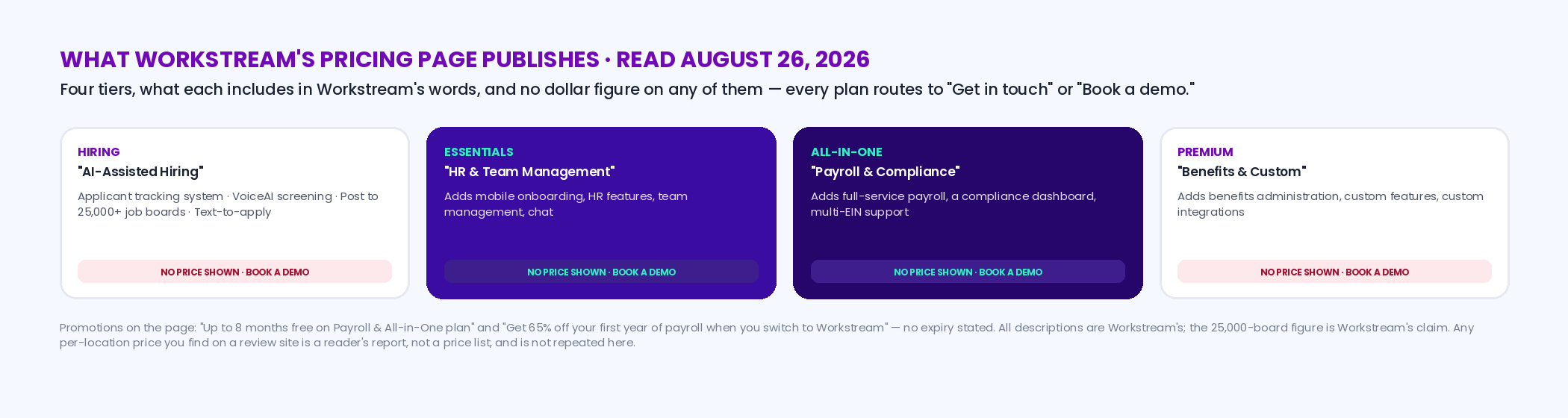
As read on workstream.us/pricing on August 26, 2026, the page shows four plans under the line "Simple plans with all the ingredients to manage your team," and no dollar figure on any of them. Hiring ("AI-Assisted Hiring") lists an "Applicant tracking system," "VoiceAI screening," "Post to 25,000+ job boards" and "Text-to-apply." Essentials ("HR & Team Management") adds mobile onboarding, HR features, team management and chat. All-in-one ("Payroll & Compliance") adds "Full-service payroll," a "Compliance dashboard" and multi-EIN support. Premium ("Benefits & Custom") adds benefits administration, "Custom features" and "Custom integrations." Two promotions are on the page — "Up to 8 months free on Payroll & All-in-One plan" and "Get 65% off your first year of payroll when you switch to Workstream" — with no expiry stated. Those are Workstream's claims about Workstream, and the 25,000-board figure is theirs, not ours. What the page does not tell you is the unit of pricing (per location, per employee, per hire, or a platform fee), the term, or the number, and any per-location figure you find on a third-party review site is a reader's report, not a price list; we don't repeat those here.
How hourly hiring software is priced — the four models, and what each rewards
When a vendor doesn't publish, you can still know the shape of the number before the demo, because the category has only four pricing models and every quote is one or a blend. Per location per month is the restaurant and retail default: predictable, scales with sites, and rewards vendors for signing chains. Per employee per month (the payroll model) scales with headcount, which for a high-turnover hourly workforce means the bill tracks your roster, not your hiring. Per hire or per applicant ties the bill to volume and is the one to watch in a high-turnover business, because turnover is exactly what makes the count large. And a platform fee plus implementation front-loads the cost and rewards long terms. The published examples below are for scale, not as Workstream proxies: Homebase publishes $0 for its Basic plan, then $30, $70 and $120 per location per month (or $24, $56 and $96 on annual billing), with hiring tools as add-ons and onboarding in the top tier; Gusto publishes payroll at $49 a month plus $6 per person on Simple, $80 plus $12 on Plus and $180 plus $22 on Premium (both read August 26, 2026). Those are those vendors' prices for those products; Workstream's model is not published and may be none of these.
| Model | The bill tracks | Good for | Watch in a high-turnover business | Published example |
|---|---|---|---|---|
| Per location per month | Number of sites | Chains and multi-unit operators who want a fixed line item | Small sites pay the same as big ones; add-ons (hiring, onboarding) are often extra | Homebase: $30 / $70 / $120 per location per month; Basic $0 (Homebase) |
| Per employee per month | Headcount on the roster | Payroll and HR where every employee is served | A 100%-turnover roster is billed for everyone who passes through, month by month | Gusto: $49 + $6 per person (Simple); $80 + $12; $180 + $22 (Gusto) |
| Per hire or per applicant | Hiring volume | Low-volume employers who want to pay only when they hire | Turnover makes the count large; ask what counts as a hire and whether rehires count | Not published by the vendors checked for this page |
| Platform fee + implementation | The contract, not the usage | Enterprise buyers with integrations and a long term | The first-year number is not the run-rate number; ask for both | Workstream lists "Custom integrations" on Premium; no figure published (Workstream) |
One of those questions is worth putting to any hourly platform: what the integration actually does. ATS integrations for hourly and driver hiring sets out the four depths, from a logo on a partner page to status written back into your system.
The six questions that turn a demo into a number
Ask them in the first call, in writing afterward, and compare vendors on the answers rather than the feature list. One: what is the unit — per location, per employee, per hire, or a platform fee — and what is the number per unit at my size? Two: what is the term, and what does the first-year price become in year two when the promotion ends? (Workstream's page advertises "Up to 8 months free" and "65% off your first year of payroll"; the question is what month nine and year two cost.) Three: what is inside the tier I'm quoted and what is an add-on — job board distribution, text-to-apply, background checks, onboarding documents, payroll? Four: what does a hire cost in fees if my turnover doubles? Five: what is the implementation fee and who does the setup? Six: what do you charge to leave — data export, notice period, early termination? The calculator below turns the answers into an annual number and a per-location and per-hire figure, on your quote.
Interactive
Quote calculator — turn any hourly hiring software quote into a year, a per-location month, and a per-hire figure
Nothing is stored or sent — this runs in your browser. Every input is the vendor's quote to you; the placeholder rate is Homebase's published All-in-One price, not Workstream's, which is not published.
The distinction the decision turns on: processing applicants vs generating them
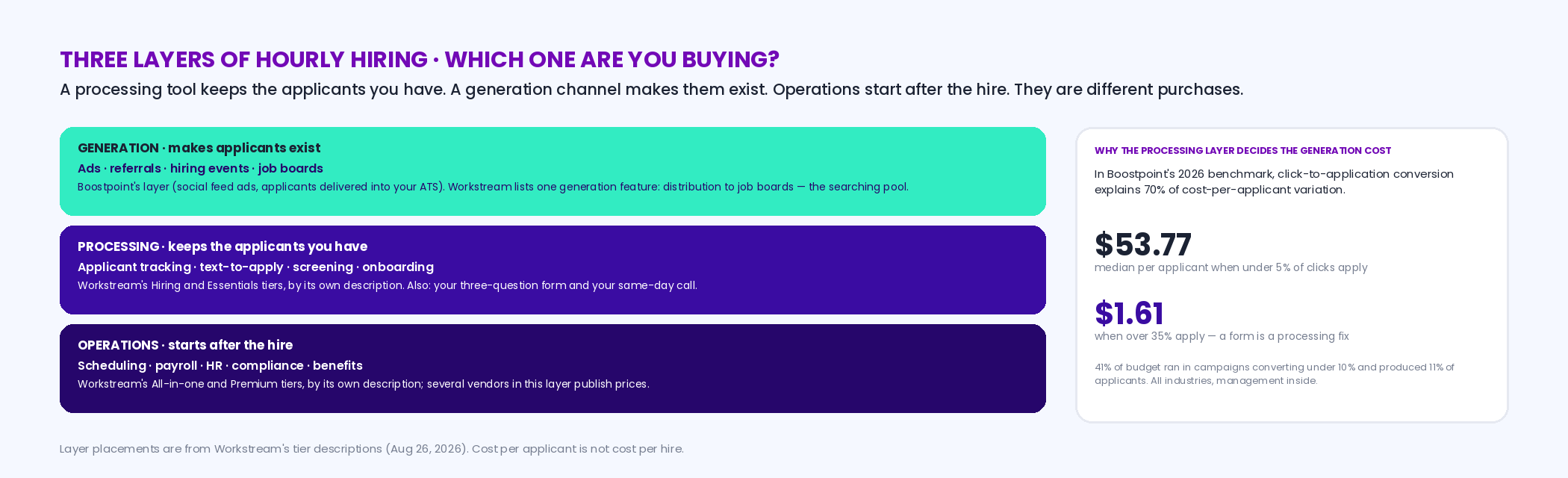
An ATS, text-to-apply, AI screening and onboarding are a processing layer: they make the applicants you already have easier to handle and harder to lose. An ad, a referral program, a hiring event and a job board are a generation layer: they make applicants exist. Scheduling and payroll are a third layer, operations, that starts after the hire. Workstream's tiers, by its own description, are processing plus operations; the "Post to 25,000+ job boards" line is the one generation feature it lists, and it is distribution to the searching pool, which every board also sells. That matters because the two most common complaints about hourly hiring software are really about the other layer: "the ATS isn't producing applicants" is a generation problem no processing tool can fix, and "we get applicants and lose them" is a processing problem no ad budget can fix. In our benchmark the processing side is visible in one number: click-to-application conversion explains 70% of cost-per-applicant variation, and campaigns converting under 5% paid a median $53.77 per applicant while those over 35% paid $1.61; 41% of all budget ran in campaigns converting under 10% and produced 11% of applicants. A three-question form is a processing fix that changes the generation cost by an order of magnitude, which is why we care about the layer Workstream sells even though we don't sell it. The finder below sorts your problem into a layer.
Interactive
Layer finder — answer three questions and see which layer your problem lives in, and which tools belong to it
Nothing is stored or sent — this runs in your browser. It sorts problems into layers and names categories, not vendors; Boostpoint sells the generation layer and says so.
Workstream alternatives, by layer
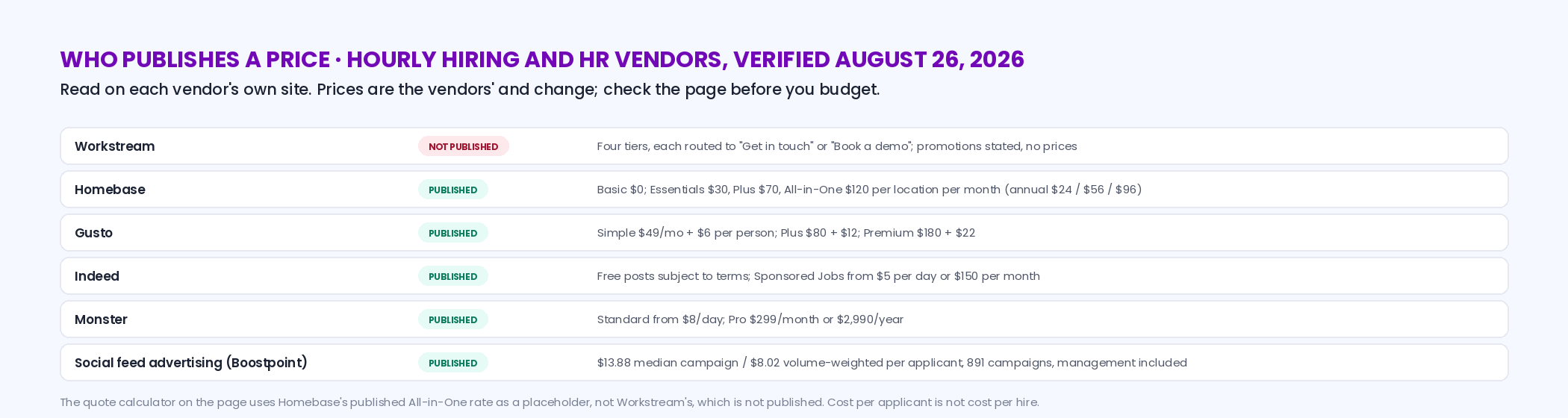
"Alternative" only means something once you know the layer. If the problem is processing, the alternatives are other hourly-workforce ATS and onboarding tools, and the fair test is the same six questions plus one: does the free or entry tier of an operations tool you already pay for cover it? If the problem is generation, no ATS is the alternative; the alternatives are the channels, and those are graded on our Indeed alternatives and Monster alternatives pages. If the problem is operations, the alternatives are scheduling and payroll products, several of which publish prices. The table states only prices verified on the vendor's own site.
| Layer | Alternative | What it is | Pricing, as verified |
|---|---|---|---|
| Processing | Hourly-workforce ATS and onboarding tools | The same category as Workstream's Hiring and Essentials tiers; compare on the six questions, and on whether text-to-apply and onboarding are in the tier or add-ons | Mostly by quote; ask for the unit and the year-two number |
| Processing (bundled) | Homebase | Scheduling and time tracking with onboarding in its top tier; hiring tools as add-ons | Published: Basic $0; Essentials $30, Plus $70, All-in-One $120 per location per month; annual $24 / $56 / $96 (Homebase) |
| Processing (your own) | A three-question form and a same-day call | Not a product — the process fix that most changes what applicants cost; our form guidance and text recruiting pages | Free; conversion explains 70% of cost variation in our benchmark |
| Generation | Social feed advertising (Boostpoint's channel) | Ads that reach the employed, non-searching majority on their phones; applicants flow into your ATS | Published: $13.88 median campaign, $8.02 volume-weighted cost per applicant, 891 campaigns (Boostpoint 2026 benchmark) |
| Generation | Indeed · Monster · referrals · hiring events | The searching pool (boards) and the non-searching pool (referrals, events) | Published: Indeed Sponsored Jobs "start at $5 per day or $150 per month"; Monster from $8/day, Pro $299/month (vendor pages); referrals at the bonus you set |
| Operations | Gusto (payroll and HR) | Payroll with HR tiers; hiring and onboarding sold separately from the payroll tiers | Published: Simple $49/mo + $6 per person; Plus $80 + $12; Premium $180 + $22 (Gusto) |
| Operations | Scheduling and payroll tools generally | The category Workstream's All-in-one and Premium tiers describe | Several publish per-location or per-employee prices; compare the year-two number after promotions |
Workstream is not alone in keeping the number for the call. CareerPlug publishes no price at all on its own site, but it does publish its full commitment terms in its help center, which is the more useful half — CareerPlug pricing reads those terms as calendar dates and grades the review sites that guess at the rest.
Who publishes a price — August 2026
The case for Workstream, made fairly
If your applicants arrive by text from a QR code on the door, if your managers hire from a phone between rushes, and if you want the same vendor to carry the applicant from "apply" through onboarding paperwork and, on the higher tiers, into scheduling and payroll, then a single processing-plus-operations platform built for hourly work is a reasonable thing to want, and Workstream's page describes exactly that. A quote-only price is not a mark against the product; it is a reason to ask the six questions and get the year-two number in writing. What no tier of it can do is the thing this page keeps coming back to: it processes applicants, and someone still has to make them exist.
What generating the applicants costs — Boostpoint's published figures
Our 2026 benchmark, 891 campaigns and 1,334 campaign-months, puts the median campaign at $13.88 per applicant and the volume-weighted average at $8.02; a normal campaign runs on $334 a month, produces 20 applicants a campaign-month and reaches 6,061 people. The sector cuts are on the benchmark, and how to read your own funnel by layer — applicants generated, applicants lost, hires made — is on recruiting analytics. None of those is a cost per hire; we measure advertising, and the hire happens in the processing layer, in your ATS, on your timeline.
Frequently asked questions
How much does Workstream cost?
Workstream does not publish prices. Its pricing page (read August 26, 2026) shows four plans — Hiring, Essentials, All-in-one and Premium — each routed to "Get in touch" or "Book a demo," and two promotions ("Up to 8 months free on Payroll & All-in-One plan"; "65% off your first year of payroll when you switch") with no dollar figure. Any per-location or per-month number you find elsewhere is a reader's report, not a price list. Ask for the unit, the number at your size, and the year-two price after promotions.
What is included in Workstream's plans?
In Workstream's words: Hiring ("AI-Assisted Hiring") lists an applicant tracking system, VoiceAI screening, posting to 25,000+ job boards and text-to-apply; Essentials ("HR & Team Management") adds mobile onboarding, HR, team management and chat; All-in-one ("Payroll & Compliance") adds full-service payroll, a compliance dashboard and multi-EIN support; Premium ("Benefits & Custom") adds benefits administration, custom features and custom integrations. Those are Workstream's descriptions as of August 26, 2026.
How is hourly hiring software priced?
Four models, alone or blended: per location per month (Homebase publishes $30 / $70 / $120), per employee per month (Gusto publishes $49 + $6 per person and up), per hire or per applicant (rare to publish; ask what counts as a hire), and a platform fee plus implementation. In a high-turnover business the per-employee and per-hire models track the churn, so the question to ask is what the bill becomes if turnover doubles. Workstream's model is not published.
What are the alternatives to Workstream?
It depends on the layer. For processing (ATS, text-to-apply, onboarding): other hourly-workforce ATS tools, compared on unit, term, add-ons and the year-two number, or the top tier of a scheduling tool you already pay for (Homebase includes onboarding in its $120 All-in-One plan). For generation (getting applicants at all): ads, referrals, hiring events and boards, which we grade on our Indeed and Monster alternatives pages. For operations (scheduling, payroll): products like Gusto, which publish prices. Many employers buy one of each.
Does Workstream find candidates, or just manage them?
By its own tier descriptions, Workstream is a processing and operations platform: applicant tracking, screening, text-to-apply, onboarding, and on higher tiers HR, scheduling and payroll. Its one generation feature is distribution — "Post to 25,000+ job boards," in its words — which reaches the searching pool that every board reaches. Producing applicants from the employed majority who aren't searching is a different layer: referrals, hiring events and social feed advertising.
Is Workstream an ATS?
Its Hiring tier lists an "Applicant tracking system" as its first feature, so yes, with text-to-apply and screening built around it, and onboarding, HR and payroll on the higher tiers. What an ATS is, and what it can and can't do for applicant volume, is on our applicant tracking system glossary page. An ATS keeps the applicants you have; it does not create them.
What should I ask in a Workstream demo?
Six things, in writing: the pricing unit and the number at your size; the term and the year-two price after the promotions end; what is in the tier versus an add-on (job board distribution, text-to-apply, background checks, onboarding documents, payroll); what a hire costs in fees if turnover doubles; the implementation fee and who does the setup; and what it costs to leave. Put the answers in the calculator on this page for an annual, per-location and per-hire figure on your quote.
Does Boostpoint compete with Workstream?
Not directly. Workstream processes applicants and runs HR and payroll; Boostpoint generates applicants with social media job ads and hands them to whatever ATS you use. Employers use both. Our published figures are for the generation layer — $13.88 median and $8.02 volume-weighted cost per applicant across 891 campaigns — and cost per applicant is not cost per hire, which happens in the processing layer and which we don't compute.
Fill the ATS you already have
Whatever processes your applicants, we can make more of them exist: ads that reach the employed majority, the wage in the first line, a three-question form, and applicants delivered into your system. We'll show you the campaigns closest to yours from the benchmark.
Book a DemoBoostpoint figures come from the 2026 Social Job Advertising Benchmark — 891 campaigns and 1,334 campaign-months: $13.88 median cost per applicant, $8.02 volume-weighted average; a normal campaign $334 a month, 20 applicants, 6,061 reached; click-to-application conversion explaining 70% of cost variation, with campaigns under 5% at a median $53.77 per applicant and over 35% at $1.61, and 41% of budget in campaigns under 10% producing 11% of applicants. Vendor plan descriptions and prices were read on each vendor's own site on August 26, 2026 (Workstream, Homebase, Gusto, Indeed, Monster), are the vendors' claims and figures, and change; no third-party price for Workstream is repeated. The quote calculator divides the reader's quoted fees by the reader's own hiring volume and is not a Boostpoint cost per hire. Cost per applicant is not cost per hire; we do not track hires and publish no cost-per-hire figure. A sample of Boostpoint campaigns, not an industry-wide study.