
Recruiting Software for Small Business: Five Layers, and Which One to Buy First
"Recruiting software" is not one category. It is five layers that solve five different problems, and almost every "best recruiting software" list ranks only one of them — the applicant tracking system. An applicant tracking system organizes the applicants you already have. It does not produce more of them. So the first question is not which product is best. It is which layer your hiring is actually stuck on, because buying the wrong layer is how a small employer spends a year paying for software while the same three roles stay open.
A note on who's writing this
Boostpoint sells one of these five layers — the advertising layer — and not the other four. We are not an applicant tracking system, we do not sell payroll or onboarding, and there are hiring problems on this page for which the honest recommendation is a product we do not make and do not resell. Where that is true, the page says so.
Every campaign figure comes from our 2026 Social Job Advertising Benchmark — 891 Boostpoint-managed campaigns on Meta across 1,334 campaign-months — and is labeled where it appears. We publish no prices for other vendors on this page. Where we have read a vendor's own published pricing we have given it its own page, and those are linked below rather than summarized here. How the underlying pricing models work — per seat, per job slot, per employee, flat fee and percentage of ad spend — is set out on recruiting software pricing.
The five layers, and the problem each one solves
Sort the market by the problem rather than by the brand and it collapses into five layers. Most small employers need two of them, and which two depends entirely on where the pipeline is stuck.
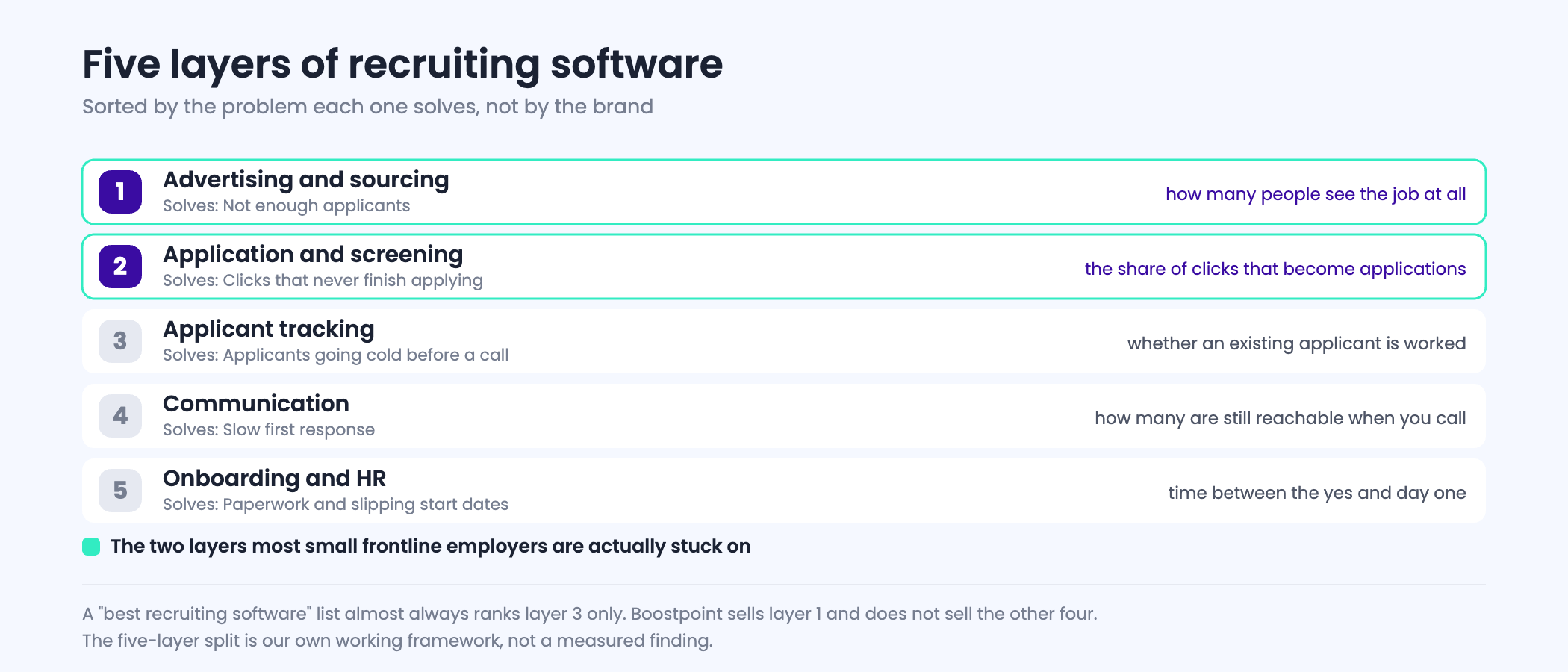
- Advertising and sourcing. Puts the job in front of people who are not looking for it. Solves: not enough applicants. This is the layer we sell.
- Application and screening. The form itself, plus knockout questions that sort applicants before a human reads them. Solves: too many unqualified applicants, and applicants who start an application and abandon it.
- Applicant tracking. A database and a pipeline view: who applied, what stage they are at, who has not been called. Solves: applicants going cold because nobody owned the follow-up.
- Communication. Text and email, usually automated on a trigger. Solves: slow first response, which for hourly roles is the same thing as losing the candidate.
- Onboarding and HR. Offer letters, paperwork, I-9, payroll handoff. Solves: the administrative load after the decision, not the hiring itself.
Layers three and five tend to attract the most products, reviews and content. Layers one and two are where the arithmetic below says most small employers are actually stuck.
Why the lists rank the wrong layer
Search for recruiting software and you get applicant tracking systems, graded against each other on features that only matter once applicants exist: pipeline stages, resume parsing, interview scheduling, offer templates. That is a real product category solving a real problem. It is simply not the problem most small frontline employers have.
The test is two questions long. Are you turning away qualified applicants because you cannot process them fast enough? If yes, buy the tracking layer, and buy it before anything else on this page. Or are you re-posting the same role for the third month because barely anyone applied? If yes, no amount of tracking software changes that number, and the money belongs at layer one or two.
What each layer can and cannot move
Here is the honest version of what buying each layer changes, stated as what it acts on rather than as a feature list.
| Layer | Buy it when | What it moves | What it will not fix |
|---|---|---|---|
| Advertising and sourcing | Too few applicants, or the same role re-posted repeatedly | How many people see the job at all | A form nobody finishes, or a role nobody wants at that pay |
| Application and screening | Traffic arrives but few applications complete | The share of clicks that become applications | An empty top of funnel |
| Applicant tracking | Applicants exist and go cold before anyone calls | Whether an existing applicant is worked | The number of applicants |
| Communication | First contact takes more than a day | How many applicants are still reachable when you call | Applicants you never got |
| Onboarding and HR | Paperwork is late, start dates slip | Time between the yes and day one | Anything before the offer |
The arithmetic a small employer should actually run
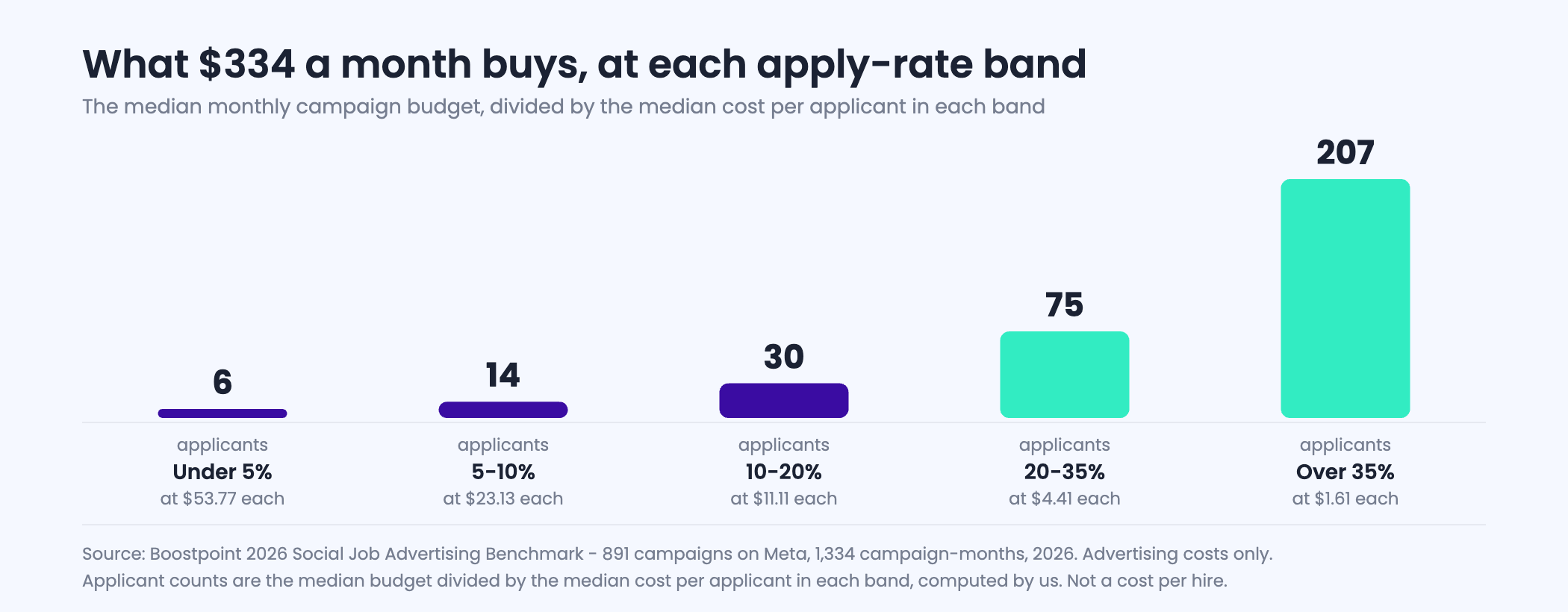
Half of all campaign-months in our benchmark ran on less than $334 and produced a median of 20 applicants from 6,061 people reached. That is the scale most small employers are operating at, and at that scale the layer you buy has a measurable effect on the applicant count.
Group every campaign by the share of clicks that finished the application — the thing the screening layer controls — and the spread is enormous. Campaigns converting under 5% paid a median of $53.77 an applicant. Campaigns converting above 35% paid $1.61. On the same $334, that is the difference between roughly six applicants and roughly two hundred.
| Apply rate | Median cost per applicant | Applicants for $334 |
|---|---|---|
| Under 5% | $53.77 | 6 |
| 5–10% | $23.13 | 14 |
| 10–20% | $11.11 | 30 |
| 20–35% | $4.41 | 75 |
| Over 35% | $1.61 | 207 |
Source: Boostpoint 2026 Social Job Advertising Benchmark — 891 Boostpoint-managed campaigns on Meta (1,334 campaign-months), 2026; advertising costs only. The applicant column is the median monthly budget divided by each band's median cost per applicant, computed by us. Cost per applicant is not cost per hire, and nothing on this page derives one from the other.
No applicant tracking system moves that column. The form does, and the ad does. That is the whole case for buying layers one and two before layer three.
Which layer is your constraint?
The tool below asks four questions about your current month and names the layer your hiring is actually stuck on. One of its five possible answers tells you to buy an applicant tracking system and not to call us.
Interactive
Which layer is your constraint
Nothing is stored or sent — this runs in your browser. Answer for a typical recent month across all your open roles. No product is recommended by name and no price is quoted.
The logic is stated so you can disagree with it: if you receive more applications than you can work, the constraint is processing, not supply. If you can work everything that arrives and still did not fill the roles, the constraint is supply. If first contact takes longer than a day, the communication layer is a constraint whatever else is true. Nothing here uses a cost per hire, because cost per applicant is not cost per hire.
What the advertising layer has to produce
If the answer above was supply, the next number to establish is how many applications your own hiring actually needs, and that ratio is yours rather than ours. Our data stops at the submitted application, so we cannot tell you how many applicants it takes you to make a hire. Your applicant tracking system or your own notes can.
Once you have that ratio, the published role-family medians turn it into an advertising figure. Those medians vary by more than twenty times across role families, which is why a single "recruiting budget" number is useless to a small employer hiring for a specific job.
Interactive
Applications needed, and what advertising them costs
Nothing is stored or sent. The applications-per-hire ratio is yours to supply — we do not publish one and we would not trust a general figure. The cost shown is advertising only.
Applications needed is hires multiplied by your own ratio. The advertising figure is that number multiplied by the published median cost per applicant for the role family, then divided across three months. It is an advertising cost and nothing else: it excludes software, staff time and everything that happens after the application arrives, and it is not a cost per hire. Your own auction will differ from the median.
“Hiring app” and “applicant tracking for small business”: what people mean when they search those
Two searches bring small employers to pages like this one, and they are asking for different things even though the results look identical.
A hiring app, in practice, means one of three products. It can mean a phone app for managing hiring — reviewing applicants, messaging them, moving them through stages from a handset rather than a desk. It can mean a marketplace app where workers and shifts are matched, which is a labor supply product rather than software you run. Or it can mean the mobile face of an applicant tracking system you already own. Before you buy anything called a hiring app, work out which of the three you actually pictured, because they solve different problems and only one of them is software.
The reason it matters is the layer question set out above. A phone app for managing applicants speeds up your response, which is worth real money in frontline hiring where the first employer to reply frequently wins. It does not create a single additional applicant. If your problem is that nobody is applying, the fastest app in the world reviews an empty list faster.
Applicant tracking for a small business is a narrower question with a clearer answer. If you are hiring for a handful of roles a year, you probably do not need a dedicated applicant tracking system — a shared inbox with a discipline about who replies and how quickly will hold up. The point at which it stops holding up is fairly specific: more than one person doing the hiring, more than a few roles open at once, or a compliance duty that requires you to show what happened to each applicant. Any of those three and a tracking system starts paying for itself, mostly by preventing applicants from being dropped rather than by finding them.
One thing worth saying plainly, because the buying guides rarely do: an applicant tracking system is a filing cabinet with rules. It is genuinely useful and it is not a source of applicants. If you are choosing between spending on tracking and spending on reach, and your problem is an empty pipeline rather than a chaotic one, the ordering above answers it.
Where this page stops and others start
This page is a map of the categories. It deliberately does not rank named products, because the ranking depends entirely on which layer you decided you needed. Where we have read a vendor's own published pricing at source, that work lives on its own page: CareerPlug pricing, Workstream pricing and Wizehire alternatives each set out what that vendor publishes and what it does not.
If the layer you need is advertising, the channel comparison is on Indeed alternatives, graded. If you want the definition of the tracking layer rather than a product, that is what an applicant tracking system is. And the case against buying anything from us is on Boostpoint alternatives, which opens with who we are the wrong choice for.
One more distinction worth drawing before you shop: automation is not a layer, it is a property some products in every layer have. Sorted by when each one runs rather than by what it is called, the eight common automations split four before the application, one at the boundary and three after, which we work through in recruiting automation software.
What we will not tell you
We will not name a best product. The honest answer changes with the layer, the industry and the number of roles, and any list that claims otherwise is ranking on something other than your problem.
We will not quote a cost per hire, and neither should any software vendor quoting ad data. Our measurement stops at the submitted application: we can see what it costs to get an interested person to raise their hand, and we cannot see whether they were screened, interviewed or hired. That gap lives in your own system and it is the most valuable thing a small employer could start recording this year.
And we will not tell you that software fixes pay. If a role has been open for four months at a rate the local market has moved past, every layer on this page will faithfully deliver you the same result faster.
“Hiring platform for small business”, and the free and cheap versions of it
The word people search changes with what they expect to buy. Recruiting software tends to mean the tracking layer. Hiring platform for small business usually means something broader — one product that posts the job, collects applications, holds the candidates and messages them, bought once and finished with. That product does exist, and the honest caveat is the one this whole page is built on: a platform spanning four layers is rarely strong at the one that is actually limiting you.
If you are searching for the best hiring platform for a small business, the useful question is not which platform wins a feature comparison. It is which layer your open role is stuck in. A platform that tracks beautifully will not produce a second applicant for a role that has had one in three weeks, and a platform with strong advertising will not stop applications getting lost if nobody is watching the inbox.
What is actually free. Free recruiting software for small business generally means one of two things, and they are not the same. There are free tiers of paid products — typically capped at one or two users, a small number of open jobs, and without the automation or integrations that make the paid tier worth having. And there are free distribution channels, which are a different category altogether: Indeed states that many jobs can be posted free subject to its usage limits and quality standards, LinkedIn allows one free open job at a time, and state job banks through the Department of Labor cost nothing at all. For a single-location employer hiring occasionally, the free channels plus a spreadsheet is a defensible position, and considerably better than paying for a system nobody logs into.
What cheap leaves out. The inexpensive end of this market is usually inexpensive in one of three ways: it omits integrations, so data moves by export; it omits support, so setup is your problem; or it omits the advertising layer entirely and assumes applicants arrive on their own. The first two are survivable for a small team. The third is the one to check before buying, because it is the layer most small employers are short of — and most of what that layer costs is media, the monthly ad budget, rather than software. On the median monthly budget in our benchmark, $334, the difference between a campaign converting under 5% and one converting over 35% is roughly six applicants against two hundred.
A reasonable sequence for a business hiring a handful of people a year: start with the free channels and whatever you already own, add the advertising layer when a role stays open past three weeks, and add the tracking layer when you cannot answer the question “who applied last Tuesday and what did we do about it?” without opening an inbox.
Hiring software for small business: ten questions to ask in the demo
Once you know which layer you are buying, the demo is where the best recruitment software for a small business separates from the rest. A small employer can't afford a year locked into a product nobody uses, so ask these questions of every vendor, in the same order, and write the answers down. A vendor that can't answer one of them on the call has usually answered it.
- "Show me the application on a phone, from the applicant's side." Count the taps and the screens. For hourly roles, a resume upload or an account creation step can be among the most expensive features a product has: in Boostpoint's 2026 Social Job Advertising Benchmark, campaigns where under 5% of clickers finished the application paid a median $53.77 per applicant, against $4.41 for those converting 20 to 35%.
- "What does it cost at my volume, including every add-on?" Ask for the price with the number of users, locations and open jobs you actually have, not the entry tier.
- "How does the price behave when I hire seasonally?" Per-job-slot and per-seat pricing treat a summer surge very differently. The five models are compared on recruiting software pricing.
- "What is the minimum term, and what happens at renewal?" Monthly, annual and multi-year contracts carry very different risk for a business that may hire in bursts.
- "Who sets it up, and how long does it take?" If the answer is your time, estimate the hours honestly.
- "Which integrations work today?" Your payroll, your background-check provider, your calendar. Roadmap items don't count.
- "How fast does an applicant hear from us, automatically?" An automatic text on apply is table stakes for frontline hiring. Our text recruiting software page explains what to check.
- "What does the reporting show per job?" At minimum: applicants, source, time to first contact and outcome.
- "Can I export all my candidate data if I leave?" In a usable format, without a fee.
- "What will this change that I can measure in ninety days?" More applicants, faster first contact or fewer lost applicants. If the vendor can't name one, neither will your results.
Score each answer against the constraint you identified with the tool above. A product that answers nine questions well and fails the one tied to your constraint is the wrong purchase, however good the demo looked.
Cloud-based recruitment software: what to check, since everything is cloud now
Almost every recruitment platform sold today is cloud-based, so "cloud" no longer separates one product from another. What does separate them is what the cloud arrangement means for your data, your cost and your applicants. Five questions settle most of it for a small employer.
- Can you take your data with you? Ask whether you can export every candidate record, note and document in a standard format, and whether the export is included or charged. A recruitment cloud you cannot leave cheaply is a cost you will pay later.
- What is the pricing unit? Cloud-based recruitment software is priced per user, per open job, per location or per employee, and the unit decides what growth costs you. Our recruiting software pricing guide sets out the models.
- What does the applicant see on a phone? Apply from your own phone before you buy. For hourly roles, a login, a long form or a resume upload at the start loses people who were ready to apply.
- Does it connect to where applicants come from? If candidates arrive from Facebook or Instagram ads, a job board and your careers page, check that all three land in the same place without manual copying. Our guide to ATS integrations for hourly hiring covers what a working connection should do.
- Who can see what? A cloud based recruitment platform holds names, phone numbers and sometimes background check results. Check that you can limit who sees what by role and location, and how access is removed when a manager leaves.
None of those questions is about the software's features, and that is the point. For a small business the cloud product that fails usually fails on cost growth, a painful export, or an application people abandon, not on a missing feature.
Frequently asked questions
AI and automated recruiting software: what it does for hourly hiring
Almost every product in the five layers now describes itself as automated recruiting software or AI recruiting software. The labels say nothing about which layer the tool sits in, so the useful question is not whether it uses AI but which of four jobs it automates, because they do not deliver the same value to a small employer.
- Automating the writing. Generating job ads and descriptions. Real time saved, no effect on how many people apply.
- Automating the sorting. Ranking or scoring applications. Useful above a certain volume, and the one place where the legal obligations bite; what those are, and where they apply, is on our AI screening page, and what the products cost is on applicant screening software.
- Automating the reply. Instant acknowledgment, scheduling and follow-up, whether through a recruiting chatbot or an automatic text. For hourly roles this is the automation that moves the most, because the applicant is deciding within hours.
- Automating the buying. Placing and adjusting the advertising itself against a feed of open jobs, which is what programmatic products do.
An automated recruitment system that does all four is not four times better; it is one useful mechanism plus three you will not switch on. For a small employer the honest test is the same as everywhere else on this page: does it change the number of qualified people who apply, or the hours between an application and a conversation? If it changes neither, it is automating work that was not the constraint.
What is a hiring app?
The phrase covers three different products. It can mean a phone app for managing hiring — reviewing and messaging applicants from a handset; a marketplace app that matches workers to shifts, which is a labor supply service rather than software; or simply the mobile interface of an applicant tracking system. Decide which one you pictured before you buy, because only the first is software you run, and none of the three creates applicants on its own.
Does a small business need an applicant tracking system?
Often not. If you hire for a handful of roles a year, a shared inbox with a clear rule about who replies and how fast will usually hold up. Three things change that: more than one person doing the hiring, several roles open at once, or a compliance duty to show what happened to each applicant. Past any of those, a tracking system tends to pay for itself — mostly by stopping applicants from being dropped, not by producing them.
What is the best recruiting software for a small business?
There is no single answer, because the five layers solve different problems. If applicants arrive and go cold, buy applicant tracking. If barely anyone applies, tracking software changes nothing and the money belongs in advertising or in the application form itself. Establish the constraint first, then shop within that layer.
Do I need an applicant tracking system?
If you are turning away qualified applicants because nobody had time to call them, yes, and buy it before anything else. If your problem is that the role has had four applicants in six weeks, an applicant tracking system will organize those four beautifully and will not produce a fifth.
How much does recruiting software cost for a small business?
Most vendors in the tracking and onboarding layers do not publish a price at all, which is itself the finding; where a vendor does publish, we have read it at source and given it a page. Advertising is the layer with a visible unit cost: half of all campaign-months in our benchmark ran on less than $334.
What does an applicant actually cost on social?
The median campaign in our 2026 benchmark cost $13.88 an applicant and the volume-weighted average was $8.02, but the range by role family runs from $2.71 for customer service and admin roles to $74.62 for therapy roles. A single average is not useful for planning one specific job.
Will software fix a role I cannot fill?
Only if the reason it is unfilled is a software problem. Software moves how many people see the job, how many finish the application, and how fast you respond. It does not move the pay, the shift pattern or the commute, and those decide more open roles than any product on this page.
What is the difference between recruiting software and recruitment marketing?
Recruitment marketing is layer one: getting suitable people to see the job and apply. Recruiting software as most lists use the term is layer three: organizing the people who did. They are complements rather than competitors, and a small employer with a supply problem usually needs the first before the second.
How fast do I need to respond to an applicant?
For hourly and frontline roles, faster than most employers manage. Our data stops at the submitted application so we cannot put a measured number on response time, but the communication layer exists because a candidate who applied to five jobs on a phone at lunchtime is reachable for hours rather than days.
Can one product cover all five layers?
Some products span two or three, usually tracking plus onboarding, or advertising plus application. None of them are equally good at all five, and a suite that is weak at your binding constraint is worse value than two products that are strong where it matters. Work out the constraint before comparing feature grids.
What is the best hiring platform for a small business?
There is no single answer, because the platforms differ by layer rather than by quality. Work out which of the five layers your hiring is stuck in — sourcing, application, tracking, communication or onboarding — and buy the product that is strongest there. A platform that spans four layers adequately is a worse purchase than one product that is excellent at your actual constraint.
Is there free recruiting software for small business?
Yes, in two different senses. Several paid products have free tiers, normally capped at one or two users and a small number of open jobs, and without the automation or integrations that make them useful at volume. Separately, there are genuinely free distribution channels: Indeed posts many jobs free subject to its usage limits, LinkedIn allows one free open job at a time, and state job banks are free. For occasional hiring the free channels plus a spreadsheet is often the right answer.
What does cheap recruiting software leave out?
Usually one of three things: integrations, so data moves by export rather than automatically; support, so implementation is your own time; or the advertising layer, so it assumes applicants will arrive by themselves. The first two are manageable for a small team. The third matters, because for most small employers the shortage is applicants rather than administration.
Is there hourly hiring software, or a blue collar hiring platform?
Those phrases usually describe the same five layers, tuned for a different applicant. What actually changes for hourly and blue collar hiring is the assumption underneath the product: no resume, application completed on a phone, and a decision made within a day or two. A blue collar hiring platform that requires a resume upload and a candidate account has kept the white-collar assumptions and renamed the marketing. Check the application flow before the feature list.
What is high volume recruiting software?
Software built for hiring many people into the same role rather than one person into a specific one. Volume hiring software generally adds bulk scheduling, event management, automated messaging and duplicate handling, and it drops the parts built around a long individual evaluation. It is worth buying when the constraint is throughput. If the constraint is that too few people apply, high volume recruiting software processes the same shortage faster.
What is cloud-based recruiting software, and does it matter?
Cloud-based simply means hosted by the vendor rather than installed by you, which in 2026 describes almost everything. It is no longer a useful selection criterion. All in one recruiting software is a more meaningful phrase, and the thing to check there is which of the five layers is genuinely good rather than merely present, since the suites are normally strong in one layer and adequate in the rest.
What is mobile recruiting software?
In practice it means two separate things, and only one matters. Mobile recruiting software for the recruiter, meaning an app for reviewing candidates, is a convenience. Mobile for the applicant, meaning an application that can be completed on a phone without an account, a resume upload or a password, is decisive for frontline roles. When a vendor says mobile, ask which side they mean.
How do you run a recruiting software comparison?
Start by naming your constraint, because a recruiting software comparison across layers is meaningless. Compare tracking tools with tracking tools, advertising with advertising. Then ask each vendor the same three questions: what it costs at your hiring volume rather than at list price, what it requires of the applicant, and what it changes that you could measure in ninety days. Top rated recruiting software lists rank vendors for the reviewer’s audience, which is usually not a frontline employer.
Is there recruiting software for staffing firms?
Yes, and it is a different product from the one this page is about. Recruiting software for staffing firms adds client management, submittals, placement tracking and billing, because an agency is selling candidates to third parties. An employer hiring for themselves does not need those and will pay for them anyway. If you are an agency, the comparison set on this page is the wrong one.
What is home care recruiting software?
The general category with caregiver-specific fields bolted on: credential and certification tracking, availability by shift and region, and in some products scheduling that connects to client visits. The hiring problem it addresses is not sorting but supply. Our benchmark puts caregiver and home care campaigns at a $3.76 median cost per applicant, among the lowest of any role family, which is worth knowing before buying software to manage a shortage.
What are text recruiting platforms?
Tools that move the conversation with an applicant to SMS, which for frontline hiring is the channel with the fastest reply. Text message recruiting software usually covers automatic acknowledgment, per-role sequences and a shared inbox, and the practical requirement is carrier registration before messages deliver reliably. How that works, and where it sits against a chatbot, is on our text recruiting software page.
What hiring software does a small business actually need first?
The layer your hiring is stuck on. If too few people apply, start with advertising and a short mobile application; if applicants arrive and go cold, start with applicant tracking or automated text follow-up; if paperwork delays start dates, start with onboarding. Many small businesses hiring a few people a year need only free job posting channels, a phone-friendly application and a clear rule about who replies to applicants and how fast.
How do you choose the best recruitment software for a small business?
Name your constraint first, then compare only products in that layer. In each demo, see the application on a phone from the applicant's side, get the price at your real volume including add-ons and seasonal peaks, confirm the minimum contract term, check which integrations work today, ask how fast applicants are contacted automatically, and confirm you can export your data if you leave. Choose the product that is strongest on your constraint, not the one with the longest feature list.
What is applicant management software?
It is another name for an applicant tracking system: software that collects applications, keeps candidate records and notes, moves people through stages such as screened, interviewed and hired, and usually sends messages and schedules interviews. It manages applicants who have already arrived; it does not produce more of them, which is the advertising layer described above.
What free hiring platforms can a small business use?
Free job posting channels such as free listings on major job boards, your state job bank and Facebook Local Jobs in Marketplace, combined with a spreadsheet or a free tier of an applicant tracking product. What is actually free on each site, and its limits, is set out on our free job posting sites page.
Is there open source recruitment software?
Yes. Open source applicant tracking systems exist; OpenCATS, for example, describes itself as a free, community-maintained applicant tracking system that you host yourself. The license is free, but hosting, security updates, backups and support become your job, which is why most small employers without IT staff choose a hosted product instead.
Is cloud-based recruitment software safe for candidate data?
It can be, but the safety depends on the vendor's controls and your settings rather than on being in the cloud. Ask how access is limited by role and location, how quickly a departed manager's access can be removed, whether you can export and delete candidate records, and where the vendor stores the data.
If the constraint is supply, that is the layer we run
We put your open jobs in front of frontline candidates on Facebook and Instagram, collect applicants through a one-minute mobile application with automated text follow-up, and deliver them into your ATS. If the tool above told you to buy applicant tracking instead, do that first.
All campaign figures: Boostpoint 2026 Social Job Advertising Benchmark — 891 Boostpoint-managed campaigns on Meta across 1,334 campaign-months in 2026, advertising costs only, published August 12, 2026, and read September 2, 2026. Median campaign $13.88 per applicant, volume-weighted average $8.02. Normal campaign: $334 median monthly budget, 20 median applicants, 6,061 median people reached. Apply-rate bands and median cost per applicant: under 5% $53.77; 5–10% $23.13; 10–20% $11.11; 20–35% $4.41; over 35% $1.61. The applicants-for-$334 column is the median budget divided by each band's median cost per applicant, computed by us and rounded down. Role-family medians and apply rates: customer service and admin $2.71 at 25%; caregiver and home care $3.76 at 31%; CNA $7.72 at 18%; warehouse and production $9.83 at 20%; sales $11.61 at 21%; LPN and LVN $12.77 at 21%; technician and mechanic $13.41 at 16%; skilled trades $14.14 at 15%; management and professional $16.87 at 16%; registered nurse $19.08 at 11%; CDL truck driver $26.86 at 8%; teacher and instructor $30.95 at 8%; allied health and imaging $54.37 at 10%; behavioral health and DSP $55.55 at 9%; therapy $74.62 at 5%. Cost per applicant is not cost per hire, and no cost per hire is derived from it anywhere on this page; the applications-per-hire ratio used in the tool is supplied by the reader and never by us. No vendor price is quoted on this page. The five-layer split and the constraint logic are our own working framework rather than a measured finding, and are labeled as such. Last updated September 2026.